How LED display work depends on the interaction between LED modules, pixels, control systems, and image processing technology.
Unlike traditional display technologies, LED screens use thousands of light-emitting diodes to create bright, high-resolution images for applications such as advertising, sports venues, events, and commercial displays.
In this guide, we explain how LED displays work, including the role of LED modules, pixel structure, receiving cards, sending systems, and brightness control. Understanding these key components can help you choose the right LED display solution for your project.
Table of Contents
Quick Answer: How Does an LED Display Work?
An LED display works by converting video signals into light through a control system. A video source sends content to the LED controller, which processes the signal and sends pixel data to receiving cards. The receiving cards control driver ICs and RGB LEDs on each module, adjusting brightness and color to form the final image.
1. What is an LED Display?
Before learning how LED display works, let’s explore what LED display is first.
An LED display is a flat screen that uses light-emitting diodes (LEDs) as the main technology to create visual effects. Unlike traditional displays that rely on backlights (such as LCDs), LEDs can emit light on their own. Brightness, energy efficiency, and color accuracy are all higher.
Learn more about the difference between LCD and LED.
LED display panel is widely used in digital LED billboards, video walls, sports LED screen, and other fields.
According to the prominent characteristics of screen imaging, we can simply divide LED displays into the following two categories:
(1) Monochrome LED display
Monochrome LED displays use monochrome LEDs (red or green) to display simple text or graphic content.
(2) Bicolor LED display
Bicolor LED displays are composed of two colors of LEDs, usually red and green.
(3) RGB LED display
Full-color LED displays combine red, green, and blue LEDs to produce millions of colors.
Therefore, it can achieve more vivid visual effects. This is also the most widely used display on the market.
RGB full-color LED display aging test
LED technology allows modular design and scalability.
It has become the first choice for advertising, entertainment, and information dissemination due to its excellent performance in indoor and outdoor environments.
1.1 The 4-Step Working Process of an LED Display
From content input to final image output, an LED display usually works through four main steps: video source, LED controller, receiving card, and LED module.
- Video source sends content: A computer, media player, camera, video processor, or media server sends images or video content to the LED control system.
- LED controller processes the signal: The LED controller decodes the signal, adjusts the resolution, and divides the image data for different screen areas.
- Receiving cards distribute data: Receiving cards inside the LED cabinets receive the processed data and send pixel-level instructions to the LED modules.
- RGB LEDs create the image: Each red, green, and blue LED adjusts its brightness. Together, millions of LEDs form the final image on the LED display.
2. Key Components of an LED Display
To understand how LED display work, it is important to understand the core components of LED screen cabinet:

(1) LED Modules
These are the building blocks of LED displays and consist of individual LEDs mounted on a circuit board.
The modules are arranged to form the screen and are responsible for light emission and color.
There are some different tpyes of LED modules: DIP, SMD, GOB, COB and more.

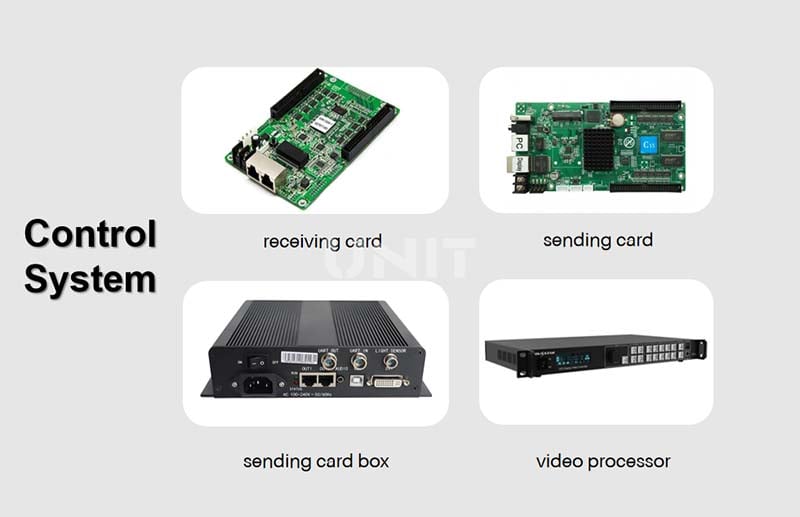
(2) Control System
The control card (also called a controller or driver card) is one of the most important components in an LED display.
It acts as the brain of the system, processing and managing the signals that control how the display operates.
The control card communicates between the content source and the LED modules, ensuring that the right visual content is displayed at the right time.

(3) Power Supply
The power supply ensures that the LED module receives consistent and stable voltage and current, which is critical to maintaining the brightness and color accuracy of the display.
Without a stable power supply, the LED display will not function properly.
It may cause problems such as flickering, uneven brightness, and even failure.

(4) Cabinet or Frame
The cabinet or frame is the structural enclosure that houses the individual LED modules, control system, power supply, and wiring.
The cabinet is the backbone of the LED display, providing physical protection and ensuring that all components are firmly in place.
It plays a vital role in the durability, stability, and flexibility of the display system.

(5) Data Cables
The data cables carry digital signals from the control system to the LED modules.
These signals determine the color, brightness, and timing of each pixel.

(6) Power Cables
The power cables provide the necessary power to the LED display, including the LEDs and other components, such as the control system and cooling system.
Proper voltage and current are critical to ensure that the display operates at optimal performance without damage.
These components work together seamlessly to deliver high-quality visuals, making LED displays reliable and versatile in a variety of environments.
3. Components of the Display System
Above, we have learned about the components of the LED display cabinet. However, it is not enough to fully understand how LED display work. Therefore, we need to understand the display system of the LED display.
The LED display system is composed of computer-specific equipment, a display screen, a video input port, and system software.
(1) Computer and Special Equipment
Computers and special equipment directly determine the function of the system.
Different types can be selected according to the different requirements of the user for the system.
(2) Display Screen
The control circuit of the display receives the display signal from the computer.
It drives the LED to emit light to produce the picture and outputs the sound by adding a power amplifier and speakers.
(3) Video Input Port
It provides a video input port, the signal source can be a video recorder, DVD player, camera, etc., and supports multiple formats such as NTSC, PAL, S Video, etc.
(4) System Software
Provides software for LED display debugging function or the program playback function. For example, NovaLCT, LED MPlayer, etc.
How LED Display Works
4. Understanding the Working Principle of LED Displays
LED screens use light-emitting diodes (LEDs) to produce visual content through a combination of digital signals, color mixing, and precise control of each pixel.
Here’s a breakdown of how it works, along with basic technical terms you should know:
4.1 Important technical terms to know
(1) Pixel Pitch
Pixel pitch refers to the distance between the centers of two adjacent pixels, usually measured in millimeters (mm).
The smaller the pixel pitch, the closer the pixels are, the higher the resolution, and the clearer the image quality.
For example, a pixel pitch of 1.5mm means a high-resolution screen that is ideal for close viewing.
Whereas a larger pixel pitch, such as 6mm, might be used for outdoor billboards where viewers are typically farther away.
(2) Pixel Density
Pixel density refers to the number of pixels packed into a given area, commonly measured in pixels per square meter (pixels/m²).
Higher pixel density allows an LED display to reproduce finer details, sharper text, and smoother images.
It is particularly important for close-viewing applications such as indoor video walls, control rooms, and digital signage.
(3) LED Scan Rate
Scan rate refers to the multiplexing ratio used by the LED driver to control rows or groups of pixels. Common scan ratios include 1/8, 1/16, and 1/32. It affects brightness, power consumption, and display performance.
Refresh rate refers to how many times the entire image is updated per second, measured in hertz (Hz). A higher refresh rate can reduce visible flicker and improve camera performance.
(4) RGB (Red, Green, Blue)
RGB is the color model that LED screens use to create a full spectrum of colors.
Each pixel on the screen is made up of red, green, and blue LEDs. By varying the intensity of each color, the display can mix millions of different colors.
This additive color model is fundamental to the functionality of LED displays, enabling them to display vivid, lifelike images and videos.
4.2 LED Control System
The LED control system acts as the brain of the LED display, controlling the operation of the entire system.
It processes input signals (such as video or image data) and converts them into digital signals that control the LEDs.
Here’s how it works:
(1) Signal Processing
The control system receives video, image, or text input from an external source (such as a computer, media player, or video server) and processes this data.
It decodes the video signal and prepares it for display on the LED screen.
(2) Control Cards and Processing Units
These devices receive processed data from the control system and send it to specific LED modules.
Each module has a corresponding controller that manages the signals for its pixels.
(2) Synchronization
The control system synchronizes the modules, ensuring that they display the same content at the same time without any visual differences.
(4) Brightness and Color Control
The control system can also adjust the LED screen brightness and color settings of individual pixels.
This optimizes visibility, contrast, and color accuracy in different lighting conditions.
(5) Remote Control and Software Interfaces
Many modern LED displays are remotely controlled via software.
The software allows users to upload content, schedule displays, and manage settings from a computer or mobile device.
It also makes troubleshooting and monitoring the display much easier, providing real-time diagnostics and performance metrics.
4.3 LED Displays Work Process
LED light array: After the LED lamp beads are packaged, they are arranged on the PCB (Printed Circuit Board) fixedly.
LED module: A unit composed of LED lamp beads and peripheral driving circuits.
LED cabinet: A unit formed by the regular combination of multiple LED modules plus a receiving card and a power supply.
LED display: A whole formed by the arrangement and combination of multiple LED cabinets.
At this time, the LED display cannot be lit up to display valid content. A dedicated controller and video source are required to light up the screen.
The source of the video source can be a computer, player, media server, camera, and other equipment.
4.4 How LED Display Work? 4 Steps!
An LED display works by converting a video signal into light through a series of processing and control stages. The basic process is video source → LED controller → receiving card → driver IC → RGB LED pixels.
Below is a diagram showing how an LED display works:
Step 1: Send the Video Source to the LED Controller
The video source, such as a computer, media player, or camera, sends the image or video signal to the LED controller. The controller receives and prepares the input signal for the LED display system.
Step 2: Process and Convert the Video Signal
The LED controller processes the incoming video signal, including signal decoding, format conversion, scaling, and image processing. It converts the content into a data format that can be transmitted to the LED display.
Step 3: Distribute Image Data to the Receiving Cards
The processed image data is sent from the LED controller to the receiving cards installed in the LED cabinets. Each receiving card distributes the assigned image data to the corresponding LED modules.
Step 4: Driver ICs Control RGB LED Pixels
The receiving card sends control data to the driver ICs on the LED modules. The driver ICs control the brightness and timing of the red, green, and blue (RGB) LED pixels. By adjusting the output of each RGB pixel, the display produces the required colors and forms the final image.
4.5 Refresh Rate, Scan Rate, and Brightness: Why They Matter
The working principle of an LED display is not only about lighting up LEDs. For real projects, refresh rate, scan rate, brightness, and power stability can strongly affect the final viewing experience.
- Refresh rate: A higher refresh rate makes video smoother and helps reduce flicker when the LED screen is recorded by cameras.
- Scan rate: Scan rate affects how the LED driver updates different rows or sections of pixels. It can influence brightness, stability, and camera performance.
- Brightness: Outdoor LED displays need higher brightness to stay visible under sunlight, while indoor fine-pitch LED screens need better low-brightness color performance.
- Power stability: A stable power supply helps avoid flickering, color inconsistency, overheating, and long-term failure.
5. How LED Screens Display Colors?
Above we have introduced the basic principles of how LED display works.
Next, we will reveal why full-color LED display can display images with such rich colors.
LED screens use the RGB (red, green, blue) color model to display colors. Each pixel is made up of tiny red, green, and blue LEDs.
By adjusting the intensity of these three colors, a wide range of colors can be created. Here’s how this process works:
5.1 RGB Color Model
Each pixel is typically made up of three LEDs – one red, one green, and one blue.
The RGB model is based on additive color mixing, where colors are combined to create new colors.
By increasing or decreasing the intensity of the red, green, and blue components, a pixel can display any color within the visible spectrum.
Red + Green = Yellow
Red + Blue = Magenta
Green + Blue = Cyan
Red + Green + Blue = White (when combined at full intensity)
5.2 Color Depth and Resolution
Color depth refers to how many shades of each color can be displayed.
A typical LED screen uses 8-bit color depth per channel (RGB), allowing for 256 levels of each color.
This adds up to over 16 million possible color combinations (256 x 256 x 256 = 16,777,216).
The resolution (pixels per inch) of an LED screen directly affects how those colors appear.
Higher resolution means more pixels are packed into the same space, resulting in a sharper, more detailed image.
6. LED Display Technology: How Modern LED Screens Work
Modern LED displays combine RGB LED pixels, driver ICs, control systems, modular cabinets, and brightness technologies to produce high-quality images at different sizes and viewing distances. The technologies used in an LED display affect its image quality, brightness, energy consumption, durability, and maintenance.
6.1 Direct-View LED, OLED, and MicroLED
Direct-view LED, OLED, and MicroLED are different display technologies. Understanding how they generate light helps explain their strengths and typical applications.
(1) Direct-View LED
Direct-view LED displays use individual red, green, and blue LED chips to create each pixel. Unlike LCD screens, they do not require a separate backlight. Multiple LED modules are assembled into cabinets, allowing the display to scale from small indoor screens to large outdoor LED billboards.
Direct-view LED technology is widely used for video walls, digital signage, stadium displays, outdoor advertising, and large-format LED screens.
(2) OLED
OLED (Organic Light-Emitting Diode) displays use organic materials that emit light when an electric current passes through them. Each pixel produces its own light, so OLED panels do not require a separate backlight.
OLED can provide deep blacks, high contrast, and thin display designs. However, OLED is a different technology from conventional direct-view LED displays and is more commonly used in TVs, smartphones, and other consumer electronics.
(3) MicroLED
MicroLED uses microscopic inorganic LEDs as self-emissive pixels. Like direct-view LED, each pixel produces its own light, but MicroLED uses extremely small LED elements to achieve high pixel density.
MicroLED can deliver high brightness, strong contrast, wide color performance, and long operating life. However, its manufacturing complexity and cost currently limit its use mainly to specialized and premium display applications.
6.2 Pixel Matrix and Modular LED Display Design
Most direct-view LED displays use a modular design in which LED modules are assembled into cabinets and multiple cabinets form the complete screen.
Each LED module contains a matrix of pixels. The pixel pitch determines the distance between adjacent pixels and directly affects pixel density and viewing distance.
This modular architecture makes LED displays highly customizable. Screen size, aspect ratio, resolution, and cabinet configuration can be adapted to different installation requirements. If a module becomes damaged, technicians can usually replace the affected module instead of replacing the entire display.
6.3 Dynamic Range and Brightness Control
(1) High Dynamic Range (HDR)
HDR expands the range between dark and bright areas of an image, helping an LED display reproduce more visible detail in high-contrast scenes. When supported by the content, controller, and display system, HDR can improve color depth and highlight detail.
(2) Automatic Brightness Control
Outdoor LED displays may use ambient light sensors or control systems to adjust screen brightness according to surrounding light conditions. Brightness can be increased during daylight and reduced in darker environments.
Proper brightness control improves readability while helping reduce unnecessary power consumption.
(3) Energy Efficiency and Durability
LED displays can provide high brightness and relatively efficient power consumption while maintaining a long operating life for large-format displays. Actual energy use depends on factors such as screen brightness, pixel pitch, content, operating hours, and display size.
The modular construction of direct-view LED displays also simplifies maintenance. Damaged modules, power supplies, receiving cards, or other replaceable components can often be serviced individually, reducing the need to replace the entire screen.
7. FAQ
No. A direct-view LED display is self-emissive, meaning its RGB LED pixels generate their own light. This is different from an LCD display, which uses a backlight to illuminate the liquid crystal panel.
Each pixel typically contains red, green, and blue (RGB) LEDs. By adjusting the brightness of these three color channels, the display combines different levels of red, green, and blue light to produce a wide range of colors.
A receiving card receives processed image data from the LED controller and distributes it to the LED modules in the corresponding cabinet. It helps ensure that each section of the display receives the correct image data.
A driver IC controls the electrical signals sent to individual LED pixels. It regulates parameters such as pixel brightness, grayscale, and display timing so that the LEDs can reproduce the required image accurately.
An LED controller processes the incoming video signal and converts it into data that the LED display can understand. Depending on the system, it can also handle scaling, signal distribution, synchronization, and other image-processing functions.
Camera flicker can occur when the LED display’s refresh behavior interacts with the camera’s shutter speed or frame rate. A sufficiently high refresh rate and properly configured display system can help reduce visible flicker in photographs and video recordings.
A failed LED module normally affects only the corresponding section of the display. Because direct-view LED screens use a modular design, technicians can usually replace the faulty module instead of replacing the entire screen.
Yes. LED display brightness can be adjusted through the control system. Outdoor displays may also use ambient light sensors or automatic brightness control to adapt the screen brightness to changing environmental conditions.
Image loss can result from problems with the signal source, LED controller, sending card, receiving card, data cables, or power system. Troubleshooting usually involves checking the signal path from the input source to the affected LED modules.
8. Conclusion
Understanding how LED display work helps you make better decisions when selecting an LED screen for your application. From LED modules and pixel technology to control systems and calibration, each component affects image quality, reliability, and overall performance.
Looking for a reliable LED display solution? Our team provides customized LED screens for advertising, events, stadiums, and commercial applications. Contact us today for professional advice and a free project consultation.
Related Posts

LED Display Not Working? Causes & Fixes
LED display not working? Identify common causes of black screens, signal loss, and faulty modules with practical troubleshooting steps.

LED Screen Components: Parts, Functions & How They Work
Learn about LED screen components, including LED modules, cabinets, power supplies, control systems, driver ICs, cables, and cooling systems.

LED Display Troubleshooting: Common Problems & Solutions
LED Display Troubleshooting for black screens, flickering, dead modules, signal loss, color issues, and low brightness.